Roles and permissions
Lumos offers two roles in a team: Owner and Inspector. The model is intentionally simple — no Manager, Read-only, or Trainee with mandatory validation. This page describes what each role can do, and why the model is designed this way.
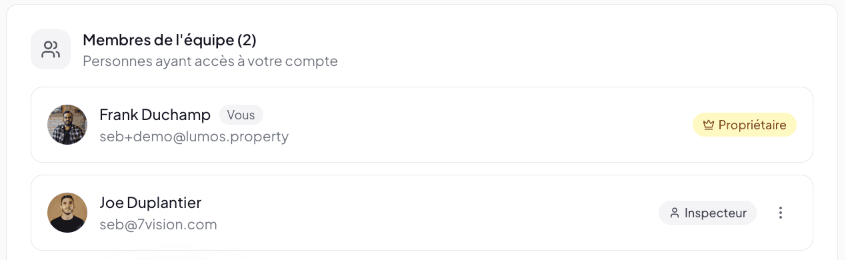
The Owner role
Identified by the Owner chip with a crown icon. There is only one Owner per Lumos account, and the role does not transfer.
The Owner is typically the person who created the account or who is responsible for billing and team governance.
What the Owner can do (in addition to everything an Inspector does)
- Invite new members to the team.
- Remove existing members.
- See all inspections of all team members — not just their own or those shared with them.
- Pay the subscription and seat fees.
- Manage billing (change plan, update payment methods).
- Configure global settings of the account (Business Configuration, default Report Template, etc.) that apply to the whole team.
What the Owner cannot do
- Co-edit a report assigned to another inspector simultaneously (Lumos does not offer simultaneous editing).
- Restore a removed member automatically (removal is final).
- Transfer the Owner role to another member.
The Inspector role
Identified by the Inspector chip with a user icon. All invited members are created with this role.
The Inspector works under the brand of the master account (logo, branding, professional contact details defined by the Owner). From the client’s perspective, the report comes from the firm, not a particular inspector (even if the responsible inspector’s name appears).
What the Inspector can do
- Create and manage their own projects and inspections.
- See their own projects, inspections, reports.
- See shared content from the team (Shared projects, Team templates, shared narratives, shared images).
- Use contract templates, report templates, banks configured at the master account level.
- Modify their own profile (phone, signature, photo).
- Prepare quotes, sign agreements, deliver reports, create invoices — the entire inspection cycle.
What the Inspector cannot do
- See inspections of other members if they are not explicitly shared with them.
- Invite or remove other members.
- Modify another member’s profile.
- Change the subscription plan or billing.
- Modify global account settings (Business Configuration) — these settings are at the Owner’s discretion.
- Promote or demote another member.
Recap table
| Action | Owner | Inspector |
|---|---|---|
| See own inspections | ✓ | ✓ |
| See shared inspections | ✓ | ✓ |
| See all team inspections | ✓ | — |
| Create projects, inspections, quotes, invoices | ✓ | ✓ |
| Invite new members | ✓ | — |
| Remove a member | ✓ | — |
| Configure Business Configuration | ✓ | — |
| Configure default templates | ✓ | — |
| Create a Personal template | ✓ | ✓ |
| Share a template with the team | ✓ | ✓ (if allowed) |
| Manage subscription and billing | ✓ | — |
| Modify own profile | ✓ | ✓ |
| Modify other members’ profile | — | — |
| Co-edit a report in real time | — | — |
Why the model is intentionally simple
Lumos does not offer:
- A Manager role (could invite without paying).
- A Read-only role (auditor, accountant).
- A Trainee role with mandatory Owner validation before delivery.
- Customizable permissions per inspector (no fine-grained ACL).
This stance reflects the reality of the trade: most inspection firms are small structures (1 to 5 inspectors) where the Owner is also an operational inspector. A complex permission matrix would add friction with no net benefit.
If your organization has finer needs (e.g. an accountant who must access invoices without touching reports), these cases are to be handled outside Lumos:
- Accounting: export invoice PDFs and transmit them via your accounting software.
- Quality audit: the Owner does the review before delivery (Lumos has no “mandatory validation” mode).