Generate and download a PDF
The PDF remains a useful deliverable format: local copy for the client, transmission to a broker or lawyer, printable version for clients who prefer paper. Lumos builds it on the fly from the current report content.
Live construction
The PDF is not pre-generated and stored. Each time it is downloaded, Lumos rebuilds the document live from the current report data, using the PDF settings you configured.
Practical consequence: if you modify the report after the initial link sharing (typo fix, photo addition, narrative adjustment), your client will see those changes the next time they download the PDF.
Configure PDF layout
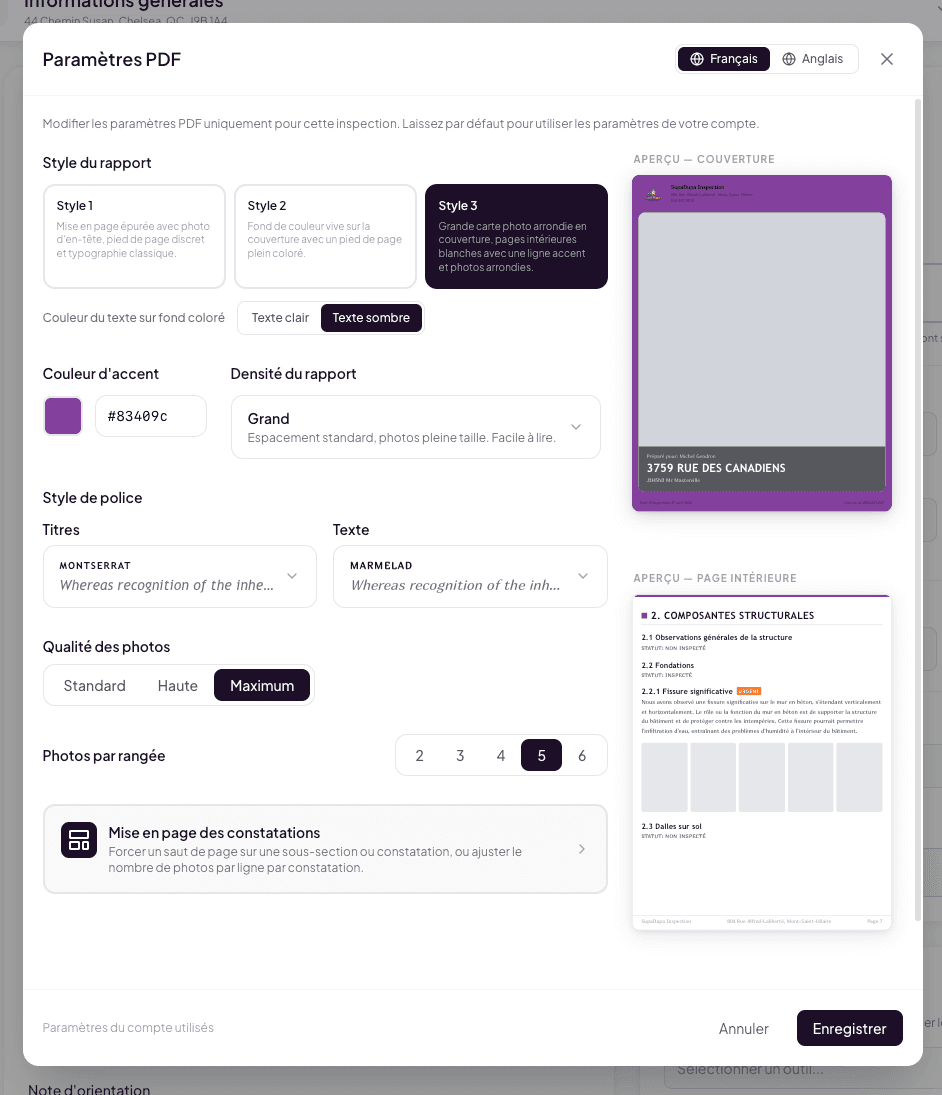
PDF settings are managed in the inspection editor’s 3-dot menu, under PDF Settings. See The 3-dot menu in the header for details. Available settings:
- Report density — Large (default), Condensed, or Ultra-condensed.
- Photos per row — 2, 3 (default), 4, 5, or 6.
- Font style — Classic (Merriweather/Inter) or Modern (Montserrat/PT Serif).
- Accent color — 10 colors to choose from.
- Per-narrative customization — force a page break on a specific subsection or narrative, adjust the number of photos per row for an individual narrative.
French / English toggle to configure both languages independently.
These settings are per inspection. You can also define account-level defaults that apply to all your inspections.
Preview the PDF
Before delivery, preview the rendering via 3-dot menu > Preview PDF. Lumos opens an exact view of what will be downloaded. You validate the layout and adjust settings as needed.
Client side: one button, one download

On the interactive report, your client sees a Download PDF button at the top right. A click triggers the immediate download. Lumos applies your PDF settings and sends the file to your client’s browser, which saves it in their downloads folder.
No intermediate steps, no validation request from your side.
When to ask the client to download the PDF rather than view online
The interactive report is generally the better experience. The PDF remains preferable in some contexts:
- The client must forward the report to a third party (mortgage broker, lawyer, additional expert). The PDF is a self-contained file, with no dependency on an external link.
- The client wants to print the report to annotate or keep a paper version.
- The client plans to consult offline (for example in a plane, in a car).
- The client wants to archive a permanent copy, independent of the interactive link.
You can encourage the download by mentioning the option in the report-sending email.
See also
- The 3-dot menu in the header — where PDF settings are managed
- The interactive web report — the online alternative
- Send the report to the client