AI Review
The AI Review is the second tab of the BNQ Compliance modal. Instead of verifying completeness (missing fields, absent photos), it analyzes the written content of the narratives you wrote yourself and proposes reformulations aligned with BNQ 3009-500 terminology and applicable Civil Code of Quebec articles.
Doubly to use with caution. AI Review combines two levels of experimentation: the BNQ gauge is in alpha, and AI is by nature suggestive. Recommendations are proposals to validate, never automatic corrections to apply blindly. Your professional judgment remains the final arbiter.
Who can use it
AI Review is reserved for the Unlimited plan. On Starter plans, the tab is visible but shows a message indicating that an Unlimited account is required to use it.
Access
Click the compliance badge in the inspection editor’s header then the AI Review tab. The analysis trigger may take a few seconds: the AI reads the content of your narratives, applies its validation grid, and returns a list of suggestions.
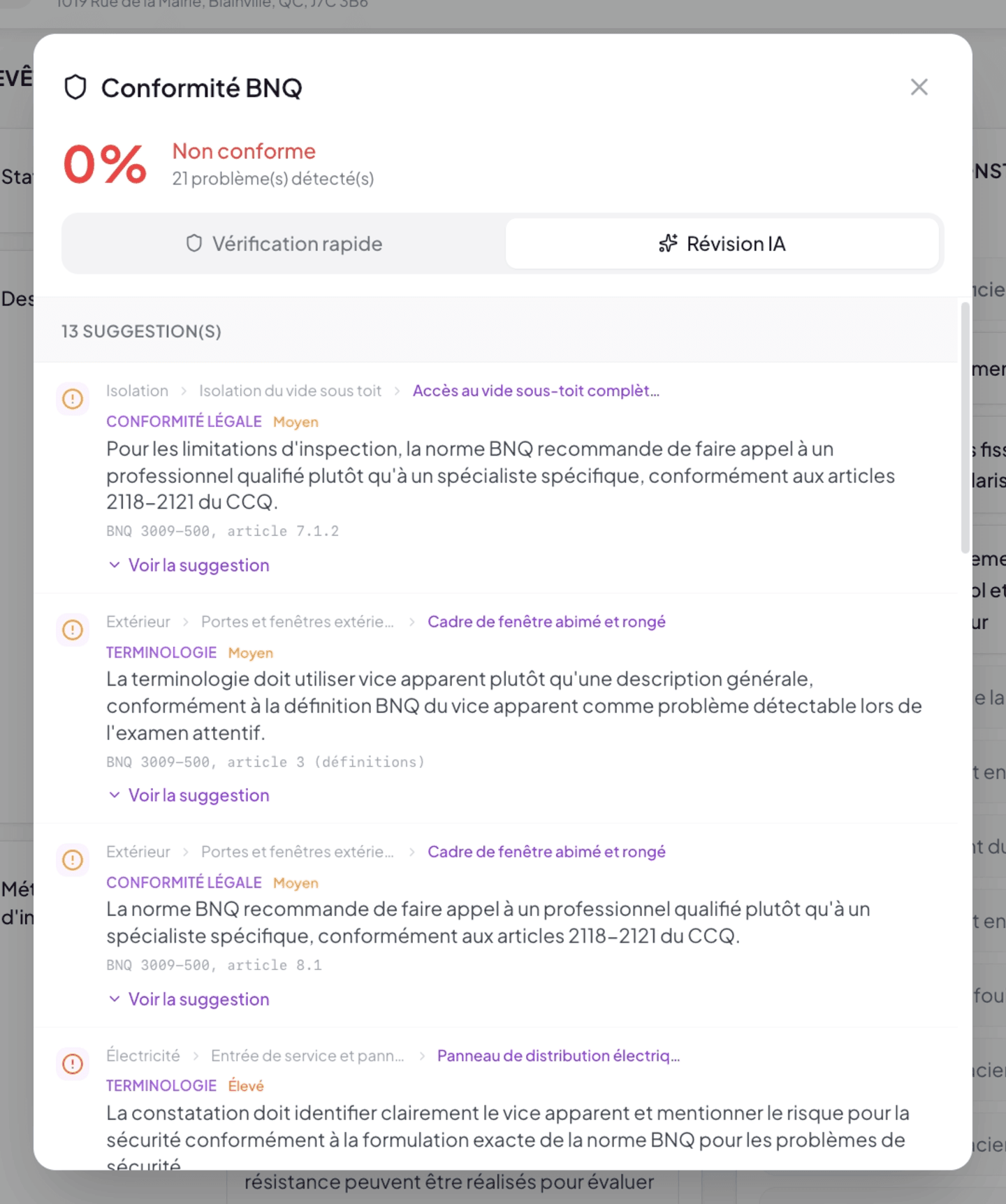
What the AI analyzes
Four verification axes on each personal narrative you wrote:
1. BNQ Structure (§8.1–8.3)
- Deficiencies must identify the defect, describe the consequence, and provide a recommendation.
- Major findings must recommend a “qualified professional” (and not a specific “specialist”), per CCQ articles 2118-2121.
- Limitations must describe the blocking condition (§7.1.2).
2. Strict BNQ terminology
The AI catches vocabulary substitutions to apply for BNQ alignment:
| Form to avoid | Form expected by BNQ |
|---|---|
| visible defect | apparent defect |
| sign of a problem | deficiency indicator |
| visual inspection | careful examination |
| room | component |
| specialized evaluation | technical expertise |
| service life | useful service life |
And the exact phrase “risk to safety or physical integrity” for safety findings.
3. Legal compliance (CCQ)
Structural or safety issues must mention “qualified professional” (CCQ 2118-2121). The assigned severity must reflect the actual gravity. Language must avoid ambiguities that would create legal risk.
4. Content quality (BNQ §9.1)
Clear, explicit, unambiguous language. Factual rather than subjective statements. Actionable rather than vague recommendations.
What the AI does not analyze
- Bank narratives are filtered out. Narratives provided by Lumos are already BNQ-compliant — the AI does not retouch them. Only your personal or modified narratives go through review.
- Field observations are never invented. The AI will not suggest a dimension, color, orientation that you didn’t enter.
- Purely stylistic rewrites of already-compliant content are avoided. The AI only proposes a suggestion if it improves compliance, not for cosmetic reasons.
Reading the suggestions
Each suggestion appears as a row with:
- Warning icon ⚠️
- Clickable breadcrumb: Section › Sub-section › Finding (click = direct navigation to the finding in the editor).
- Category tag:
LEGAL COMPLIANCE— issues tied to CCQ or structural BNQ articles.TERMINOLOGY— BNQ vocabulary substitutions.CONTENT— writing quality, narrative structure.GENERAL_INFO— cross-cutting elements (brief description, limitations).
- Severity tag: Low, Medium, High.
- Suggestion text + BNQ article reference.
- See suggestion link to expand.
The “See suggestion” panel
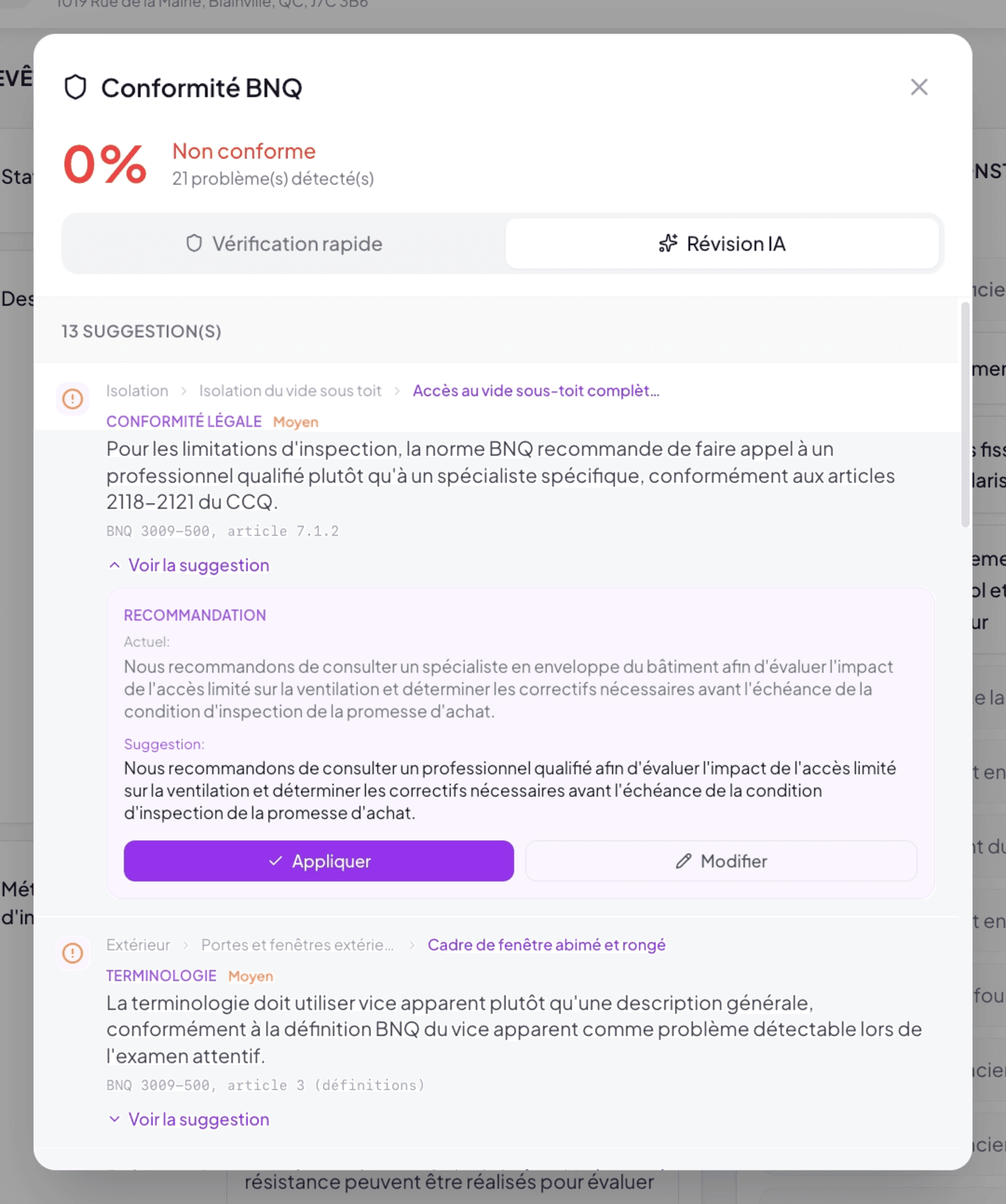
When expanded, you see two blocks:
- Current — the current text of the narrative.
- Suggestion — the AI-proposed reformulation, with the reasoning (why this modification improves compliance).
Two buttons:
- Apply (purple) — immediately replaces the narrative text with the suggestion.
- Modify — opens the suggestion for editing so you can adjust before applying.
The AI proposes, you validate. Before applying a suggestion, read it carefully. The AI may misread the context of a finding. If the suggestion doesn’t fit, simply ignore it (not applying = doing nothing) or use Modify to produce a variant.
Key difference from Quick Check
| Quick Check | AI Review | |
|---|---|---|
| Required plan | All | Unlimited |
| Verification type | Completeness (presence/absence) | Writing quality |
| Affects the % score | Yes | No — separate list |
| Uses AI | No — deterministic rules | Yes |
| Touches Bank narratives | No | No |
| Speed | Instant | A few seconds per analysis |
A report can show 100% on Quick Check and still have several AI suggestions pending. Conversely, AI can praise the writing quality of a still-incomplete report.
See also
- Quick Check
- Best practices
- Chapter 8 — The Narrative Bank — Bank narratives are not analyzed by AI
- Chapter 2.5 — Subscription — to upgrade from Starter to Unlimited plan