General Information
The General Information page is the landing screen of an inspection. It gathers everything that does not directly belong to a building section: the property’s identity card, documents received before the visit, and the logistical configuration of the inspection (billed services, tools used, people present).
The screen splits into two columns: Property on the left, Inspection on the right.
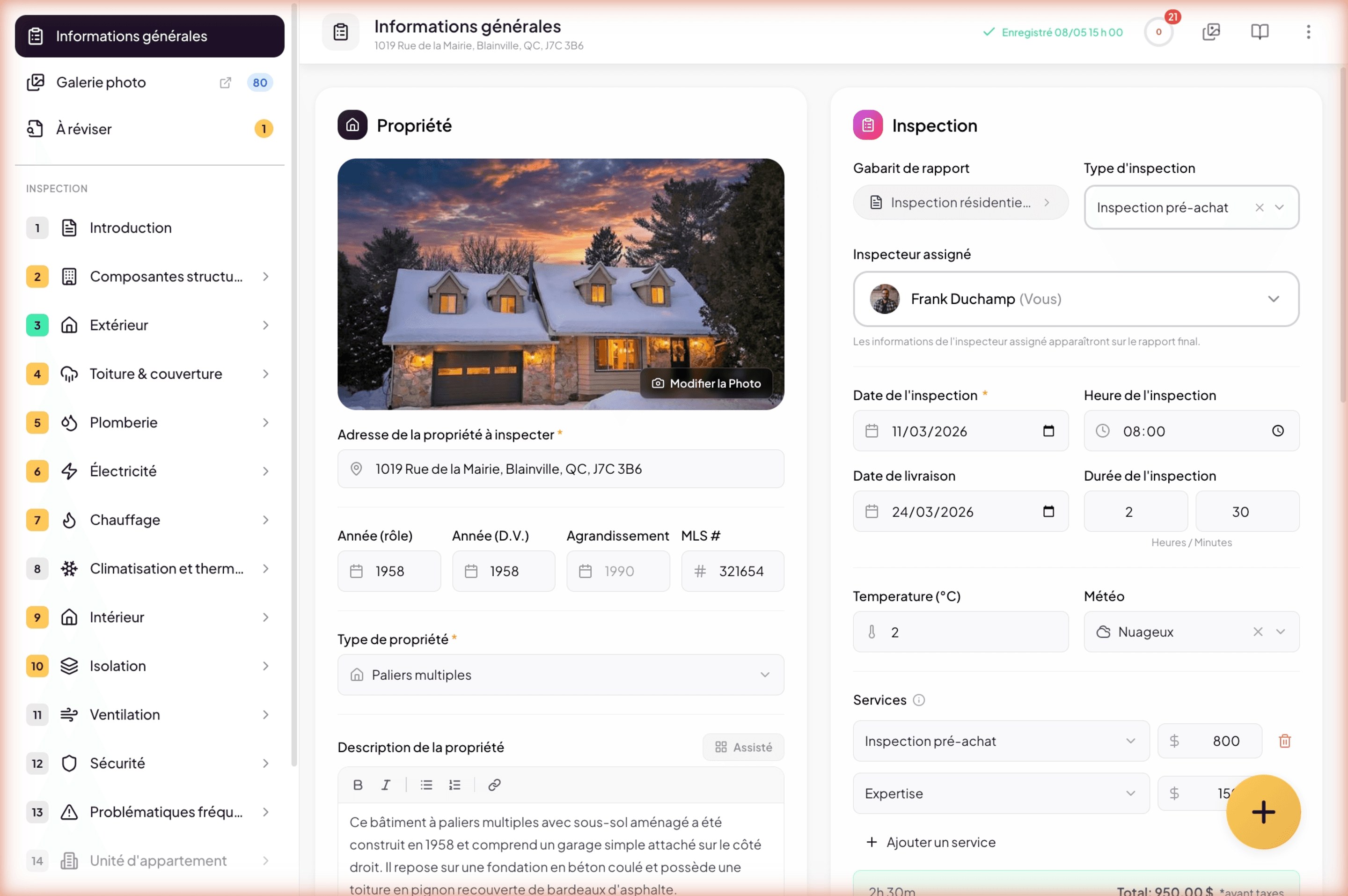
Property column
Property photo
A main photo is shown at the top. The Edit Photo button lets you replace it. This photo appears in the final report.
Building identification
- Property address to inspect required
- MLS # — MLS listing number, right under the address
- Year (roll) — the year built per the municipal assessment roll
- Year (Sel. Decl.) — the year built per the seller’s declaration
- Extension — the year of an extension if applicable
- Area — the building area, in sq ft or m². It is the same field as in the description’s assisted mode: editing one edits the other
- Property type required — dropdown reusing the list of 27 types available at project creation
Property description
A rich text editor to describe the building in a few sentences. You can write freely, or go through assisted mode.
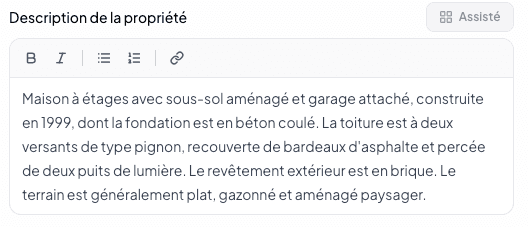
The Assisted button opens a window where you describe the building by tapping chips, one per characteristic. Tap a chip again to deselect it.
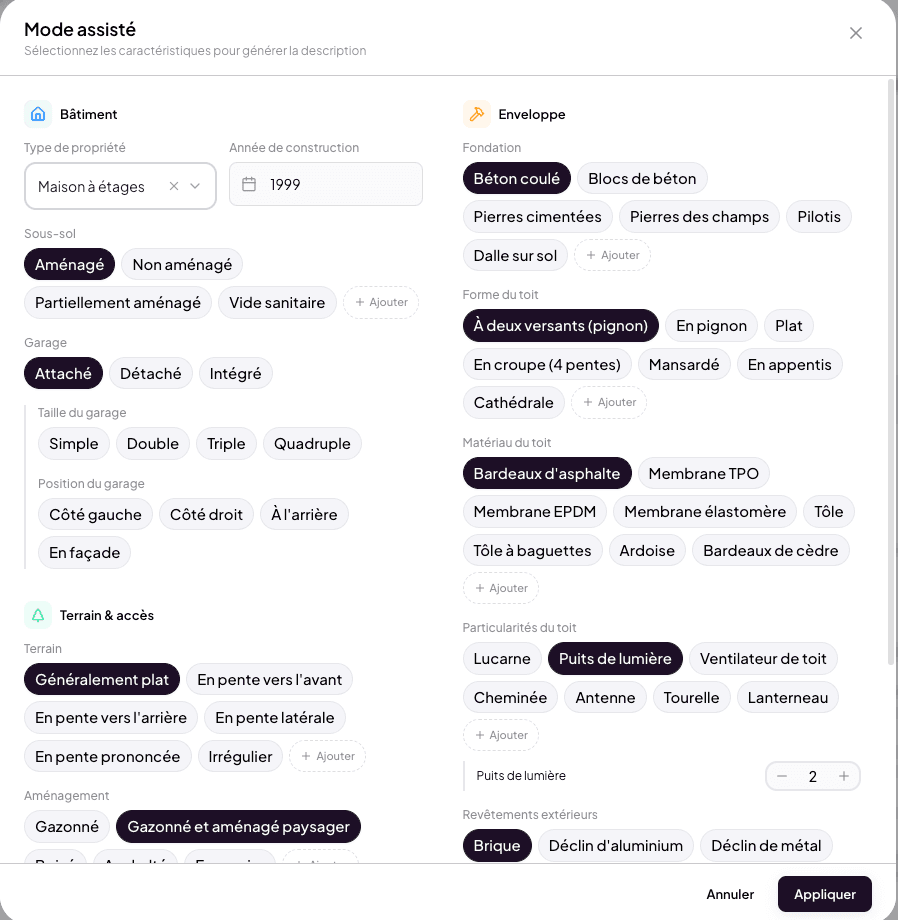
Three blocks: Building (type, year, basement, garage), Envelope (foundation, roof, cladding) and Terrain & Access (terrain, landscaping, parking, walkway). Some choices reveal others — a garage brings up its size and position, a cladding brings up its position on the building, a roof feature brings up a quantity counter.
One click on Apply assembles your selections into sentences, then the AI rewrites them as a flowing paragraph and drops it into the field. It rewrites without inventing: no fact is added to or removed from what you checked.
Three things to know:
- Back to draft — a link appears under the field after enhancement and restores the raw version, before rewriting. It disappears as soon as you edit the text by hand.
- Your selections are kept — they stay attached to the inspection. Reopen assisted mode later, even after closing the report: everything is still checked. You adjust one field and reapply, without starting over.
- The language followed is the report’s, not your interface’s. An English report produces an English description.
The option lists and the wording used can be customized: see Property description in the template settings.
Orientation note
A standard pre-formatted text that defines the orientation convention used in the report (front, back, right side, left side, when standing on the street facing the building). You can keep it as-is or edit it.
Documents obtained for the inspection
A checklist of documents you received from the client or the seller before the inspection. Check based on what you actually consulted:
- Not applicable — No document received
- Seller’s declaration
- RBQ inspection list of the New Residential Building Warranty Plan (5 years or less)
- Previous inspection report(s)
- Expertise report(s)
- Annex D — Category 2
- Annex E — Owners’ cooperative
- Location certificate
- Co-ownership declaration (divided)
- Various invoices
- Other(s)
The checked list appears in the report to inform the client of the documents taken into account.
Under each checked document you can attach the file you received. These files share one registry with the project’s Document Center: a document uploaded in the Document Center with the matching category (for instance “Seller’s declaration”) and linked to this inspection shows up here, and a file attached from this list shows up in the Center with its category. Files are stored in a private space of the project.
Inspection column
Report Template
Shows the template selected at creation (for example Residential Inspection - BNQ 3009-500). Clicking this field gives access to the template selector; beware, changing template wipes all entered data — a safety snapshot, kept for 90 days, still lets you restore it. See Change or reset the template.
Inspection type
Default is Pre-purchase Inspection. Other types exist (for example pre-handover) depending on activated templates.
Assigned inspector
The inspector responsible for this inspection. On a solo account, this will be you (mention “You”). On a team account, you can reassign. The name and signature of the assigned inspector will appear on the final report.
Dates and duration
- Inspection date required
- Inspection time
- Delivery date — planned date to send the report to the client
- Inspection duration — Hours and Minutes (two fields)
Environmental conditions
- Temperature (°C) — outdoor temperature on the day of inspection
- Weather — dropdown to select the weather conditions of the visit
These two pieces of information appear in the report and may explain inspection limits (inaccessible roof in high wind, for example).
Services
The billable items of the inspection. Adding a service here automatically generates an invoice in the project, attached to the final file sent to the client.
The Total is computed automatically (before tax).
Inspection tools
You can save your default tool list and adjust it per inspection. Lumos provides a pre-built list (Voltage tester, Tape measure, Binoculars or zoom camera, Drone, High-intensity lighting…) with a usage description for each. You can also add a custom tool.
The checked list appears in the report to demonstrate the rigor of your methodology.
People
The parties involved in the inspection, displayed as expandable accordion cards:
- Requester required (by default, the project’s requester contact)
- Co-requester — if the purchase involves multiple buyers (couple, partners), use the + Add a co-requester button below the main card. Co-requesters appear in the report and on the cover page under “Prepared for: Name1 & Name2”.
- Requester’s agent
- Seller
- Seller’s agent
You can add other custom roles via the + Add button (for example a family member, a lawyer, an expert).
Presence during inspection
Each card shows a Present / Absent indicator. By default, everyone is considered present. If you mark someone as absent, the report automatically splits the list into two groups: Present during inspection and Not present.
Legal entity
If a party is a company, an estate, or another legal entity rather than an individual, enable Legal entity mode on the card. The First name / Last name fields are replaced by a single Legal entity name field.