Start an inspection without a quote
Lumos offers a quick path to create an empty inspection, without going through quote preparation or sending an agreement to the client. This path is for special cases where the contractual relationship is handled outside Lumos, or to recover a file already started on paper.
For the usual case, see Start an inspection with a quote, which secures the contractual relationship before the visit.
When to use it
This path targets specific situations:
- You already signed the agreement with your client outside Lumos (paper, email, another software) and you simply want to create the inspection in Lumos to write the report.
- You are catching up an old file that you now want to manage in Lumos.
- You need a test or demonstration inspection without sending an email to a real client.
- You manage the quote and billing separately in another tool.
For most of your daily activity, the with-quote flow remains the right choice: it avoids back-and-forth, automatically generates the agreement compliant with your association, and keeps a digital trail of client acceptance.
Start the flow
From the project detail, the Quick Actions panel shows the + New Inspection button with a dropdown arrow. Click the arrow to open the menu, then select Create the inspection.
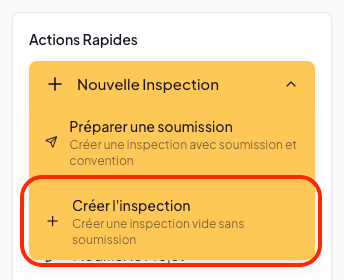
The option is described in the menu as “Create an empty inspection without a quote.”
Choose a template
As with the with-quote flow, Lumos asks you to choose an inspection template: a System model (Lumos default) or a Personal model.
The template choice is permanent for this inspection. To use another template, you will have to create a new inspection.
Click Use this template.
What is created
The inspection is created immediately, empty, and appears in the project with:
- Its inspection number derived from the project number.
- Its initial status In progress.
- No agreement attached. To add one later, open the project’s Document Center: in the inspection journey, ① Generate offers the Quote and/or agreement button, which creates as drafts the agreement alone (custom template or association agreement, with its annexes), the quote alone, or both together. You then send them with ② Send and signatures.
- No email sent to the client.
You can open the inspection and complete its information (date, time, duration, services, tools, people) directly in the General Information page of the inspection.
Limits of this path
Skipping the Lumos-sent quote has two consequences worth keeping in mind:
- No digital trace of the agreement in Lumos, unless you upload the signed PDF afterwards via the Upload Document button on the project.
- No automatic timestamp of client acceptance. If you need formal proof of engagement, the with-quote flow is preferable.
Step-by-step
A Guidde video dedicated to this quick path is in the works.
See also
- Start an inspection with a quote — the recommended path
- Quote tracking