Available agreement templates
When you prepare a quote, Lumos lets you choose from a list of service agreement templates. This page lists the templates offered, what distinguishes them, and how they appear in your account.
Templates offered by Lumos
Three “system” templates are available depending on your profile:
Inspection Service Agreement (BNQ-compatible)
This is the Lumos default template, available for all inspectors. It aligns with the BNQ 3009-500 standard (Building Inspection — Pre-purchase Inspection of Primarily Residential Buildings) and covers the essential clauses expected from a residential inspection agreement.
It is the right choice if:
- You do not have AIBQ or APCHQ affiliation.
- You do not want to use a specific association’s form.
- You want a neutral and legally sound document for the Quebec market.
AIBQ Service Agreement — two versions
Official form of the Quebec Building Inspectors Association, available if you are an AIBQ member. The form is pre-filled with your member number and carries AIBQ branding. Two versions are offered:
- BNQ 3009-500 standard (default) — the AIBQ agreement compliant with the BNQ standard, for inspections performed under it. This version also pre-fills your RBQ licence number, your certificate category and your insurers (professional and civil liability), configured in your profile.
- AIBQ standard — the association’s classic agreement, based on its own standard of practice.
It is the right choice if:
- You are an AIBQ member.
- Your client knows AIBQ and explicitly asks for the AIBQ form.
- You want to highlight your professional membership in the contractual documentation.
APCHQ Service Agreement — two versions
Official form of the Quebec Association of Construction and Housing Professionals, available if you are an APCHQ member. The form requires your APCHQ member number that you enter in Business Configuration > Service Agreements. Two versions are offered:
- BNQ 3009-500 standard (default) — the APCHQ agreement compliant with the BNQ standard, for inspectors holding an RBQ certificate.
- Non-REIBH standard — the APCHQ agreement for inspections outside the scope of the Quebec building inspection regulation (REIBH), for inspectors without an RBQ certificate.
It is the right choice if:
- You are an APCHQ member.
- Your client or a partner (broker, builder) specifically asks for the APCHQ form.
Choosing your default version
If your association offers two versions, an Agreement version selector appears in Business Configuration > Service Agreements, inside your association’s card. The selected version becomes the default in all your sends — and you can always switch to the other version in the dropdown when preparing a quote.
Custom templates
In addition to system templates, you can create your own templates in Business Configuration > Service Agreements. There you draft agreements tailored to specific cases:
- Commercial inspection.
- Pre-sale inspection with specific clauses.
- Bilingual agreement.
- Variant with adjusted exclusions or liability caps.
Your custom templates appear in the dropdown of the Prepare a quote modal, alongside system templates.
Before customizing, get expert help. A modified agreement engages your legal liability. If you adapt the BNQ template or an association template, have it validated by your legal advisor or your association.
Where your templates are configured
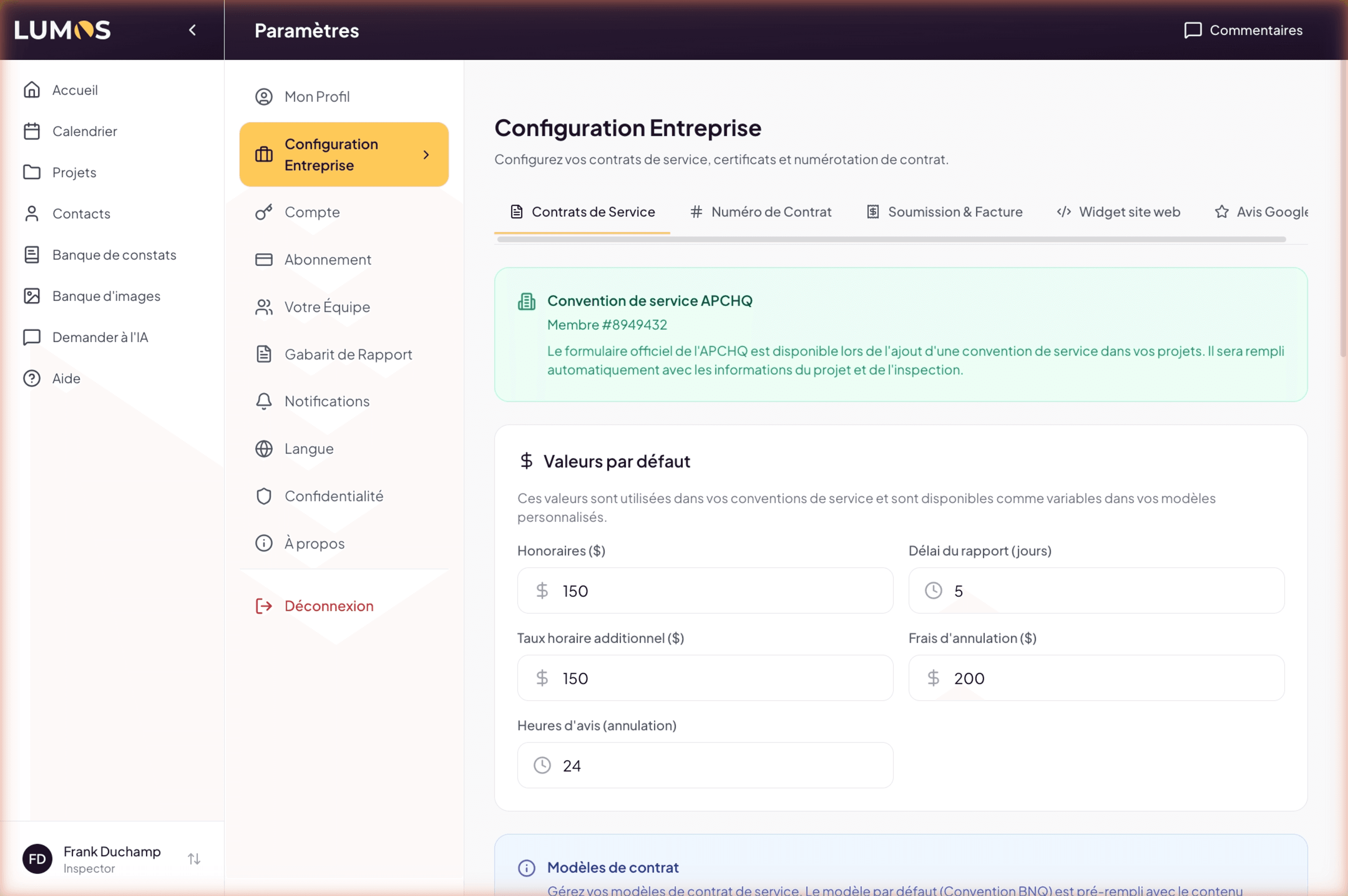
All settings related to agreements are centralized in Business Configuration > Service Agreements. There you find:
- Your professional affiliations (AIBQ, APCHQ, REIBH, Réseau-IBC, etc.) and the associated member numbers.
- The default template that Lumos selects when you start a quote.
- Your custom templates created on demand.
- The introduction, exclusion, and signature texts that can be adapted to your style.
See Chapter 2 — Your Lumos account for configuration details.
How Lumos picks the proposed template
When you open the Generate documents window (Prepare a quote option), Lumos suggests the default template configured in your profile. You can change it in the dropdown before generating to switch to another available template (system or custom).
The choice is per quote: you can use BNQ for a classic residential inspection and a custom template for a commercial inspection, without changing your default.
Format of the generated document
Whatever the chosen template, Lumos generates a PDF:
- Pre-filled with project data (address, client, co-requester if set on the project, date, amount) and your profile (affiliations, numbers).
- With the relevant association’s branding (AIBQ, APCHQ) or your business’s (BNQ and custom templates).
- Ready to be sent to the client from the Document Center.
The PDF is generated as a draft when you click Generate (① of the inspection journey in the Document Center) and stays attached to the inspection. It is not attached to the email: when you send it for signature, the client reads and signs it in their client portal. Only a custom agreement, which cannot be signed online, is sent as an attachment with the paper plane icon.
See also
- 10.1 The service agreement as legal contract
- 10.3 Annexes and options
- Business Configuration > Service Agreements — create and manage your templates
- Start an inspection with a quote — where the template choice is made